DialogBuilder
emzed_gui.DialogBuilder lets you build custom parameter dialogs without
writing Qt code. Fields are declared by chaining add_* calls; show()
assembles the dialog and returns the entered values.
DialogBuilder is a thin wrapper around
guidata, a Python library for
automatic GUI generation from data models. guidata's native API requires
declaring a DataSet subclass with class-level attributes; DialogBuilder
removes that boilerplate so dialogs can be constructed dynamically with
plain method calls.
Basic usage
import emzed_gui

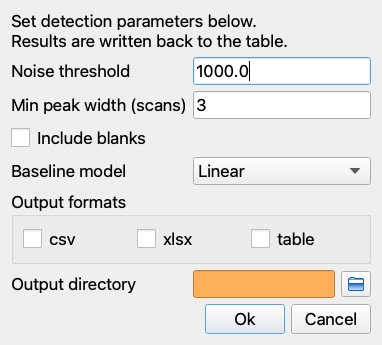
builder = emzed_gui.DialogBuilder(title="Peak detection settings")
builder.add_instruction("Set detection parameters below.")
builder.add_instruction("Results are written back to the table.")

builder.add_float("Noise threshold", min=0.0, default=1000.0)
builder.add_int("Min peak width (scans)", min=1, default=3)
builder.add_bool("Include blanks", default=False)
builder.add_choice(
    "Baseline model",
    choices=[("linear", "Linear"), ("flat", "Flat")],
    default="linear",
)
builder.add_multiple_choice(
    "Output formats",
    choices=[("CSV", "csv"), ("Excel", "xlsx"), ("Table", "table")],
)
builder.add_directory("Output directory")

result = builder.show()

if result is not None:
    run_detection(
        noise=result.noise_threshold,
        width=result.min_peak_width_scans,
        include_blanks=result.include_blanks,
        baseline=result.baseline_model,
        formats=result.output_formats,
        output_dir=result.output_directory,
    )
show() returns None when the user clicks Cancel; otherwise it returns a
DataHolder whose attributes correspond to the field labels converted to
snake_case.
Chaining
All add_* methods return the builder, so calls can be chained:
result = (
    emzed_gui.DialogBuilder("Export options")
    .add_float("m/z tolerance (ppm)", min=0.0, default=5.0)
    .add_bool("Include blanks", default=False)
    .show()
)
Field methods
Fields map to guidata data items. The most commonly used ones are:
| Method | guidata type | Notes |
|---|---|---|
add_int(label, ...) |
IntItem |
integer input |
add_float(label, ...) |
FloatItem |
float input |
add_string(label, ...) |
StringItem |
single-line text |
add_bool(label, ...) |
BoolItem |
checkbox |
add_choice(label, ...) |
ChoiceItem |
drop-down |
add_multiple_choice(label, ...) |
MultipleChoiceItem |
multi-select |
add_file_open(label, ...) |
FileOpenItem |
single-file picker |
add_files_open(label, ...) |
FilesOpenItem |
multi-file picker |
add_file_save(label, ...) |
FileSaveItem |
save-file picker |
add_directory(label, ...) |
DirectoryItem |
folder picker |
add_color(label, ...) |
ColorItem |
colour picker |
All methods accept at least label (required, used as the field name in the
dialog) and default (optional pre-filled value). Keyword arguments are
forwarded to the underlying guidata item.
add_instruction
Adds a plain-text instruction paragraph at the top of the dialog.
add_button
Adds an inline action button. The callback receives a DataHolder
snapshot of the current field values.
def preview(data):
    emzed_gui.show_information(f"Will use tolerance: {data.mz_tolerance} ppm")

builder = emzed_gui.DialogBuilder("Settings")
builder.add_float("m/z tolerance", default=5.0)
builder.add_button("Preview", preview, check_other_fields_first=True)
result = builder.show()
check_other_fields_first=True validates all fields before calling the
callback; set it to False (default) if the callback should fire even when
some fields are not yet valid.
show() options
| Parameter | Description |
|---|---|
ok_button |
Label for the accept button; pass None to omit it |
cancel_button |
Label for the reject button; pass None to omit it |
defaults |
dict mapping snake_case field names to override values |
defaults lets you inject runtime values without reconstructing the
builder:
Passing a value whose type does not match the field raises ValueError.
DataHolder
show() returns a DataHolder instance (or None on cancel).
- Attribute access uses the field label converted to snake_case:
"Noise threshold"→result.noise_threshold - Missing attributes return
Nonerather than raisingAttributeError. result.as_dict()returns a plaindictof all values.
Complete example
import emzed_gui

def run_integration(table):
    result = (
        emzed_gui.DialogBuilder("Integration parameters")
        .add_instruction("Configure peak integration below.")
        .add_float("RT tolerance (min)", min=0.0, default=0.1)
        .add_float("m/z tolerance (ppm)", min=0.0, default=5.0)
        .add_choice(
            "Baseline model",
            choices=[("linear", "Linear"), ("flat", "Flat")],
            default="linear",
        )
        .add_bool("Write back results", default=True)
        .show()
    )

    if result is None:
        return  # user cancelled

    integrate(
        table,
        rt_tol=result.rt_tolerance_min,
        mz_tol=result.mz_tolerance_ppm,
        baseline=result.baseline_model,
        writeback=result.write_back_results,
    )